
 Halloween W'sheets!

Coding has become one of the most valuable skills children can learn, but for many parents and teachers, the word itself can feel intimidating.
When adults hear “coding,” they often picture advanced computer programming, complicated symbols on a screen, or teenagers building apps. Because of this, many people assume coding is too difficult for young children or that elementary-aged students need strong math or technology skills before they can even begin.
In reality, coding for children looks very different.
At the elementary level, coding is not really about memorizing computer languages or building professional software. Instead, coding activities help children develop the thinking skills behind programming:
• logical thinking
• sequencing
• problem-solving
• creativity
• planning
• persistence
• pattern recognition
These skills are useful far beyond computers.
Children use computational thinking when they solve math problems, follow multi-step directions, organize ideas in writing, build with blocks, complete science experiments, or even explain the rules of a game.
The wonderful thing about coding is that young children can begin learning these skills through simple, playful activities that often feel more like games than lessons.
Some coding activities do not even require a screen.
Here are several easy coding activities that work well for elementary-aged children at home or in the classroom.
Practice giving step-by-step instructions
One of the best introductions to coding starts with something surprisingly simple: giving directions.
Programmers must give computers extremely precise instructions. Computers cannot “guess” what we mean the way humans often can.
Children can practice this idea by explaining how to complete an everyday task such as:
• making a peanut butter sandwich
• brushing teeth
• tying shoes
• packing a backpack
• building a LEGO tower
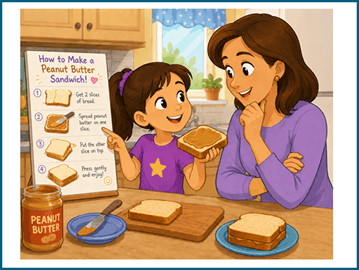
The fun begins when the adult pretends to be a robot.
For example, if a child says:
“Put peanut butter on the bread,”
the “robot” might place the entire jar on top of the loaf of bread.
Children quickly realize that instructions must be:
• clear
• specific
• in the correct order
This activity teaches sequencing, which is one of the most important coding concepts.
It also encourages children to think carefully about how tasks are organized step by step.
Try unplugged coding activities
Many parents assume coding always involves computers or tablets, but some of the best beginner coding activities are completely screen-free.
These are often called “unplugged coding” activities.
Unplugged activities help children understand how coding works before they ever type anything on a device.
For example, children can:
• create arrow cards for directions
• guide a family member through a maze
• move a toy across the floor using commands
• write simple movement instructions
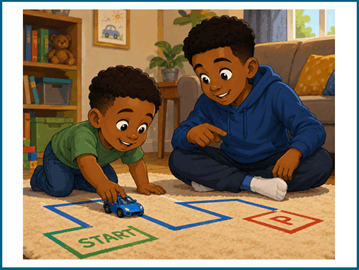
Commands might include:
• move forward
• turn left
• turn right
• jump
• stop
Children begin to learn that coding is really about creating instructions and solving problems logically.
You can even place obstacles around a room and challenge children to guide someone safely through the course using only spoken commands.
This introduces the idea of algorithms.
An algorithm is simply a set of ordered instructions for completing a task.
Even young children can begin understanding algorithms through movement games and hands-on play.
Build and continue patterns
Patterns are a major part of coding and computational thinking.
Children who recognize patterns more easily often have an easier time understanding early programming concepts later on.
Fortunately, pattern activities can be done almost anywhere.
Children can:
• build repeating LEGO patterns
• create bead necklaces
• draw color sequences
• use blocks or stickers
• clap rhythm patterns
• make movement sequences
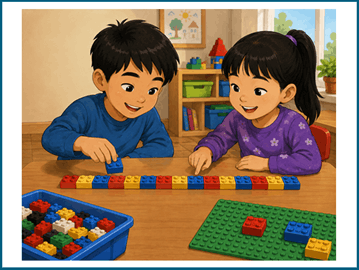
For example:
red-blue-red-blue-red-blue
Then ask:
What comes next?
Can you continue the pattern?
Can you create your own rule?
Can you make a more complicated pattern?
Pattern recognition helps children notice structure and predict outcomes, both of which are important in coding.
It also strengthens mathematical thinking and attention to detail.
Create a treasure hunt with directions
Treasure hunts are a fantastic way to combine movement, problem-solving, and coding ideas.
Hide a small object somewhere in the house or classroom and ask children to write a sequence of directions that leads another person to the object.
For example:
• take 5 steps forward
• turn left
• crawl under the table
• look behind the chair
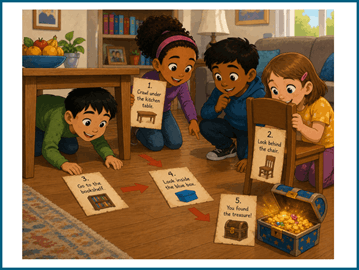
Children quickly discover that directions need to be:
• accurate
• organized
• complete
If the instructions are unclear, the person following them may end up in the wrong place.
This mirrors what programmers experience when coding. Small mistakes in instructions can completely change the outcome.
Treasure hunts also help children practice spatial awareness and sequencing skills in an engaging way.
Introduce debugging
One of the most valuable lessons children can learn from coding is that mistakes are normal.
Professional programmers constantly find and fix errors in their code. This process is called debugging.
Children can practice debugging through simple games and activities.
You might:
• intentionally make a mistake in a pattern
• give incorrect directions
• skip a step in instructions
• create an error in a recipe
• build something incorrectly

Then ask:
“What went wrong?”
“How can we fix it?”
This encourages children to think critically and revise their thinking rather than giving up immediately.
Debugging activities are especially helpful because they teach resilience.
Many children become frustrated when they make mistakes in schoolwork. Coding helps children see that mistakes are actually part of the learning process.
Instead of failure, errors become clues that help improve the final result.
Try real-world coding challenges
Coding ideas can also be connected to everyday life.
For example, children can:
• organize morning routines into steps
• write directions for a board game
• design obstacle courses
• sort objects into categories
• create “if-then” rules
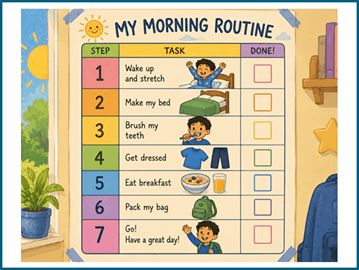
For example:
“If it is raining, grab an umbrella.”
“If the toy bin is full, put books on the shelf instead.”
These types of logical rules are closely connected to programming concepts.
Children often enjoy seeing that coding ideas already exist in daily routines and decision-making.
Explore beginner coding websites and apps
Once children show interest, beginner coding websites can provide additional practice and creativity.
Popular beginner-friendly platforms include:
• Code.org
• Scratch
• Tynker
Many of these platforms offer:
• free beginner lessons
• coding puzzles
• interactive games
• themed activities
• guided tutorials
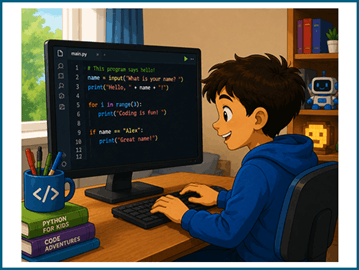
Children often learn best through short, consistent exposure rather than long sessions.
Even 15–20 minutes of coding exploration can build confidence over time.
Two popular choices are:
• ScratchJr
• Scratch
Instead of typing complicated code, children drag colorful coding blocks that snap together like puzzle pieces.
This makes coding less frustrating for beginners because children can focus on ideas and creativity rather than spelling or typing errors.
With Scratch and ScratchJr, children can:
• animate characters
• create digital stories
• design simple games
• add sound effects
• make characters move and talk
• experiment with sequences and loops
Many children become highly motivated because they can immediately see the results of their ideas on the screen.
For younger children, ScratchJr offers simpler controls and larger visual elements.
Older elementary students often enjoy Scratch because it allows for more creativity and increasingly advanced projects.
Coding platforms like these also encourage experimentation. Children naturally test ideas, make changes, and improve their projects over time.
That process of revising and improving is an important part of learning to code.
Why coding activities are so valuable for kids
Coding activities support much more than technology learning.
They help children strengthen:
• executive functioning
• problem-solving
• logical reasoning
• creativity
• focus
• persistence
• organization
• flexible thinking
Coding also encourages children to become active creators rather than passive users of technology.
Instead of only consuming games and apps, children begin thinking:
“How does this work?”
“How could I make something like this?”
“What happens if I change this instruction?”
These kinds of questions develop curiosity and confidence.
Most importantly, coding teaches children that learning often happens through trial and error.
Children experiment.
They test ideas.
They revise mistakes.
They improve step by step.
Those are valuable life skills in every subject, not just computer science.
At the elementary level, coding should feel playful, creative, and encouraging.
The goal is not to turn every child into a professional programmer.
The goal is to help children become curious thinkers who feel comfortable solving problems, exploring ideas, and learning from mistakes.